

# 1. 问题复现
环境:Ipython 3.8
``` py
import matplotlib.pyplot as plt
import pandas as pd
data = pd.read_csv('/Users/me/Documents/small_cust.csv')
data['first_catg'].value_counts().plot()
plt.show()
```
图是画出来了,但折线图中本应该展示中文分类标记的,现在X轴标记却出现了许多小方块。同时shell终端也有很多Warnings。
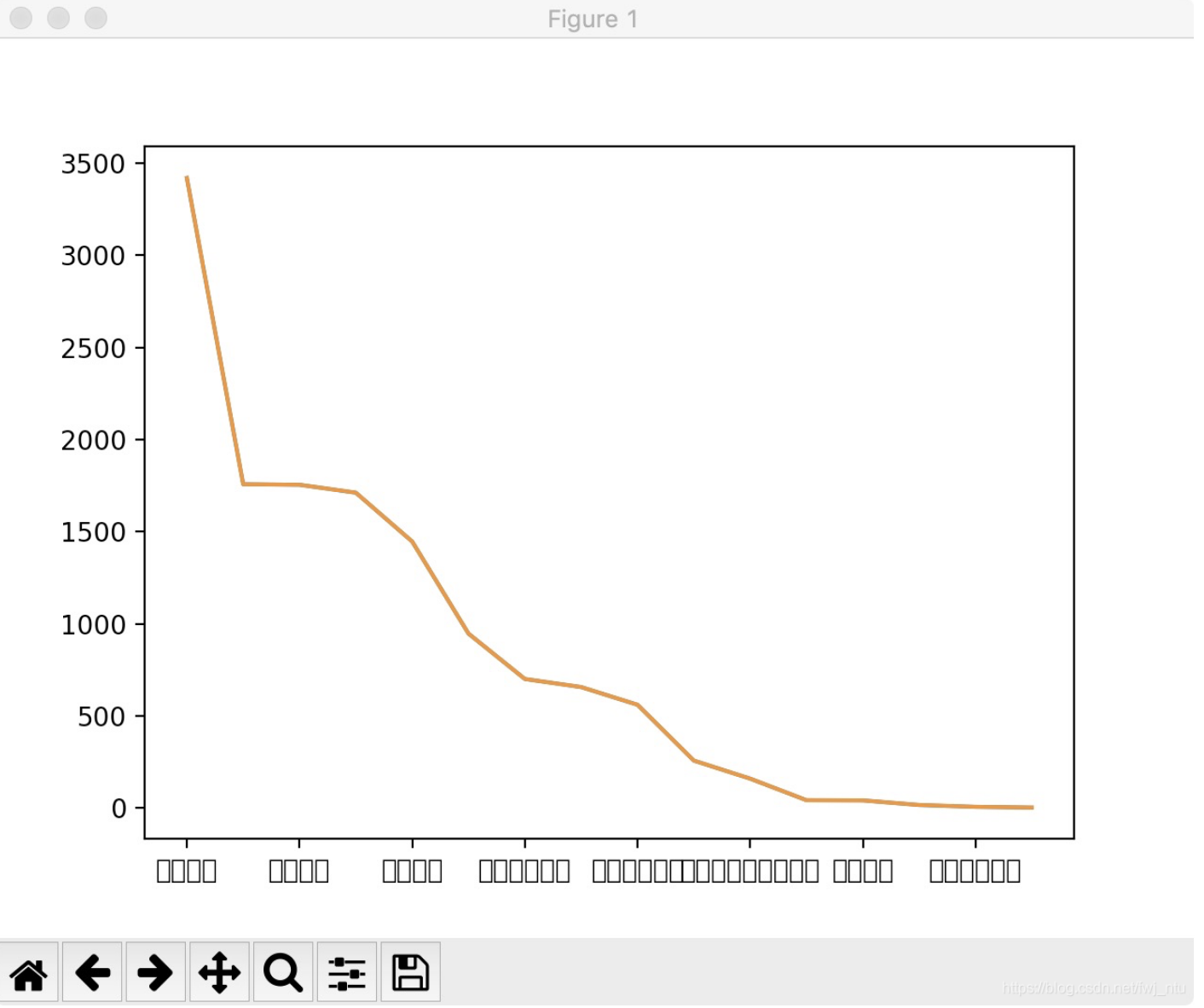
这些RuntimeWarning提示缺少了很多字体。
```
/Library/Frameworks/Python.framework/Versions/3.8/lib/python3.8/site-packages/matplotlib/backends/backend_agg.py:214: RuntimeWarning: Glyph 36141 missing from current font.
font.set_text(s, 0.0, flags=flags)
/Library/Frameworks/Python.framework/Versions/3.8/lib/python3.8/site-packages/matplotlib/backends/backend_agg.py:214: RuntimeWarning: Glyph 29289 missing from current font.
```
# 2.问题定位
### Mac使用的字体库在哪里?
本机使用的字体在Library下面的Fonts文件夹下,一眼望去根本不清楚哪个字体是支持中文的。
```
cd /Library/Fonts/
```
### 目前用的是哪种字体,导致出现乱码?
不清楚
### 展示中文需要依赖哪种字体?
目前支持中文的字体很多,看到网络上很多人选择了黑体"SimHei",可以试试。
### Python使用的字体库在哪里?
``` py
import matplotlib
# 查找字体路径
print(matplotlib.matplotlib_fname())
# 查找字体缓存路径
print(matplotlib.get_cachedir())
```
matplotlib有自己的字体库,路径如下:
```
/Library/Frameworks/Python.framework/Versions/3.8/lib/python3.8/site-packages/matplotlib/mpl-data/fonts/ttf
```
cd到这个目录下,却没有发现SimHei.ttf字体。
# 3.解决问题
### 1.网络上下载字体simhei.ttf,放到matplotlib的字体库中
即:/Library/Frameworks/Python.framework/Versions/3.8/lib/python3.8/site-packages/matplotlib/mpl-data/fonts/ttf
### 2.修改matplotlibrc文件
```
vim /Library/Frameworks/Python.framework/Versions/3.8/lib/python3.8/site-packages/matplotlib/mpl-data/matplotlibrc
```
#### 这是matplotlib的配置文件,打开文件后找到Fonts的配置部分:
1、去掉font.family前面的“#”,让该配置生效
2、去掉font.sans-serif前面的“#”,让该配置生效,并且加入SimHei字体,具体如下所示
3、保存文件并推出(shell命名:Esc,:wq)
``` py
font.family : sans-serif
#font.style : normal
#font.variant : normal
#font.weight : normal
#font.stretch : normal
#font.size : 10.0
#font.serif : DejaVu Serif, Bitstream Vera Serif, Computer Modern Roman, New Century Schoolbook, Century Schoolbook L, Utopia, ITC Bookman, Bookman, Nimbus Roman No9 L, Times New Roman, Times, Palatino, Charter, serif
font.sans-serif : Arial, SimHei, Bitstream Vera Sans, Lucida Grande, Verdana, Geneva, Lucid, Helvetica, Avant Garde, sans-serif
#font.cursive : Apple Chancery, Textile, Zapf Chancery, Sand, Script MT, Felipa, cursive
#font.fantasy : Comic Neue, Comic Sans MS, Chicago, Charcoal, ImpactWestern, Humor Sans, xkcd, fantasy
font.monospace : DejaVu Sans Mono, Bitstream Vera Sans Mono, Computer Modern Typewriter, Andale Mono, Nimbus Mono L, Courier New, Courier, Fixed, Terminal, monospace
```
### 3.重新启动Ipython,字体配置生效
亲测:如果不重新启动Ipython,所作出的修改不会生效,仍旧会出现乱码的情况。所以提示一定要重新打开Ipython。
并且在画图前,要手动选取所需使用的字体。
``` py
import matplotlib.pyplot as plt
plt.rcParams['font.sans-serif']='SimHei'
```
### 4.Last but not Least:
如果在配置matplotlibrc文件时,在font.sans-serif中配置参数时,把中文字体排在第一位,如:
```
font.sans-serif : SimHei,Arial, Bitstream Vera Sans, Lucida Grande, Verdana, Geneva, Lucid, Helvetica, Avant Garde, sans-serif
```
配置成功后,重启Ipython,不需要再次执行:
plt.rcParams[‘font.sans-serif’]=‘SimHei’
也可以正确展示中文字体。但如果SimHei排在了Arial的后面,不执行上面一行代码,仍旧会显示乱码,因为Arial是英文字体,不支持中文字体。
由此可见,sans-serif参数默认是按顺序进行选择的。
Glyph 26426 missing from current font.解决matplotlib画图中文字体乱码问题

文章转载地址:
Glyph 26426 missing from current font.解决matplotlib画图中文字体乱码问题
https://inx.fun/article/1193958